

The system shows "sent" but the push notification is not displayed
The notification was sent to a different device than the one in hand
How to check
Get the deviceUUID of the device in hand and verify that the notification was sent to that specific device. The identifier of the device the notification was sent to is listed in the technical details of the mobile push notification send under the contact field.
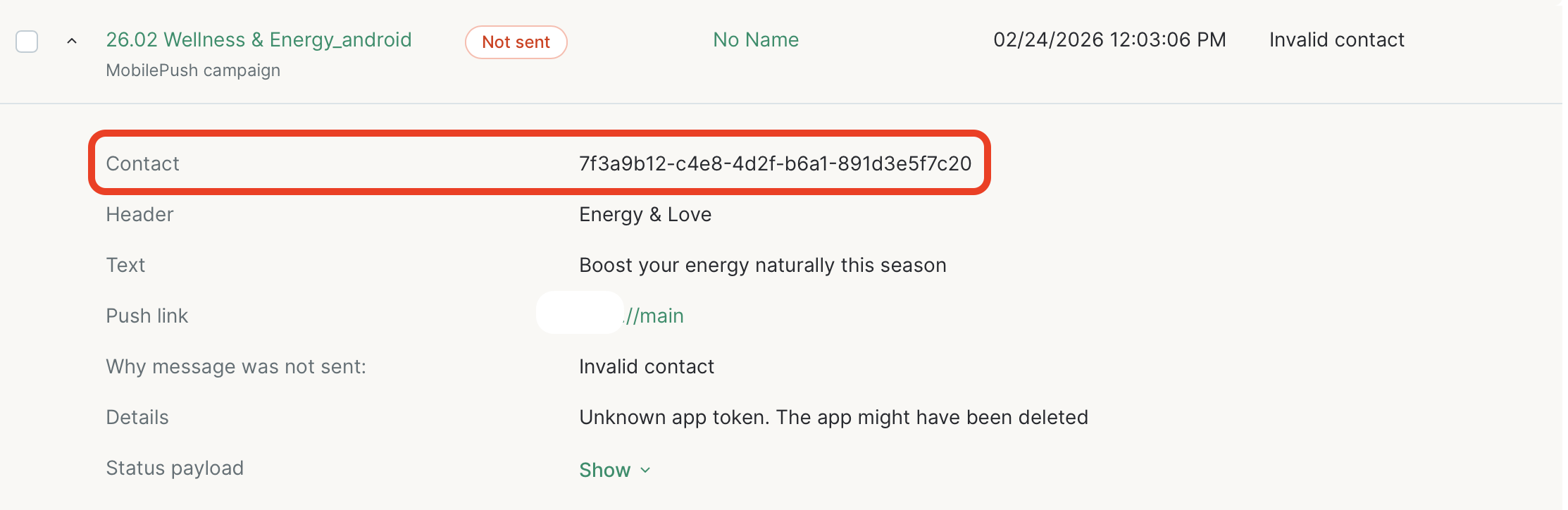
If the device identifier and the contact identifier in the notification do not match, the notification is being sent to a physically different device. Find the customer who owns the device in hand and send the notification to them instead.
How to fix
Trace which device the notification is being sent to.
Battery saver mode is enabled on the device
How to check
Open the Settings app on the device. Go to Battery and check whether adaptive battery or battery saver mode is enabled.
How to fix
Disable adaptive battery or battery saver mode.
The messaging service class is not implemented
How to check
Review the onMessageReceived method and verify that it matches the Push Notifications Setup for Firebase integration guide. If Mindbox.handleRemoteMessage is not being called, the notification is being rendered by your own code — you will need to debug this on your end.
How to fix
Implement the steps from the Push Notifications Setup for Firebase integration guide.
The messaging service class is not registered in the manifest
How to check
Check the AndroidManifest.xml where the notification handling service is registered and verify that it matches the Push Notifications Setup for Firebase integration guide.
How to fix
Implement the steps from the Push Notifications Setup for Firebase integration guide.
Notification handler classes were not passed to the Mindbox SDK, or initialization does not follow the guide (SDK v2 and later)
How to check
Review the Mindbox.init call and verify that it matches the Specify the library in the init method step. Note that the method must be called synchronously in Application.onCreate.
How to fix
Implement the method following the guide — make sure to pass the push notification service name (Firebase).
The Mindbox.init call must be synchronous in Application.onCreate. If this is not possible for any reason, Application.onCreate must at minimum contain a call to initPushService — init itself can be called elsewhere in the app.
Updated 8 months ago