

4.1. iOS: Sending Push Notifications
Before you begin, make sure you’ve completed these steps:
You've successfully completed the "Sending Push Notifications on iOS" step, if:Push notification has been sent from Maestra and is displayed on the device. Use this instruction to check if the push notifications are sent.
A push notification is a message shown on a mobile device, with a title, text, and a link that takes you to a webpage or app screen when tapped. Unlike rich push notifications, standard push notifications do not display buttons or images.
1. Add push notification handling in the app settings
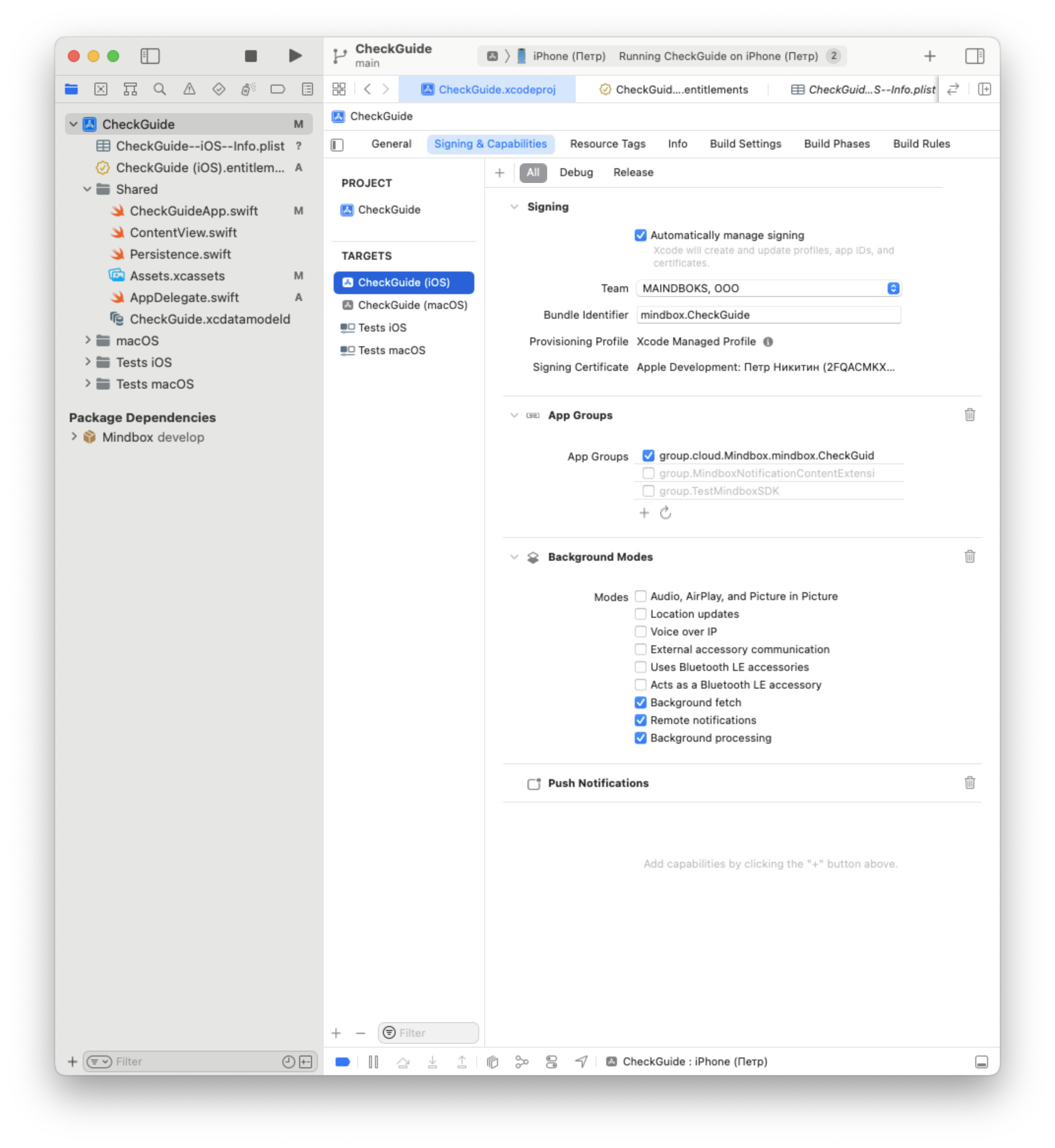
- Open the
Runner.xcworkspacefilein Xcode. - Open the project settings.
- Tick what you will set up on the list of Targets.
- Navigate to the
Signing & Capabilitiestab. - Click the "Add" button and select
Push NotificationsandBackground Modes. - In the Background Modes section, enable the following:
- Background fetch;
- Remote notifications;
- Background processing.
Provide your Maestra Forward Deployed Marketer with the keys for connecting to Apple Push Notification service.
2. Explicitly add Maestra (Mindbox) iOS SDK
Specify the Maestra iOS SDK dependency explicitly in the Podfile to reference its methods from the app code.
target 'Runner' do
  use_frameworks!
  use_modular_headers!

	pod 'Mindbox'

end
3. Request permission to display notifications
In the AppDelegatefile extend the class interface using UNUserNotificationCenterDelegate.
import UserNotifications
// AppDelegate.swift file

@UIApplicationMain
class AppDelegate: UIResponder, UIApplicationDelegate, UNUserNotificationCenterDelegate
#import <UserNotifications/UserNotifications.h>
// AppDelegate.h file
// Add UNUserNotificationCenterDelegate
@interface AppDelegate : RCTAppDelegate <UNUserNotificationCenterDelegate>
@property (nonatomic, strong) UIWindow *window;
@endIn the AppDelegatfile implement the notification permission request and call Mindbox.shared.notificationsRequestAuthorization(granted: granted) within it.
The permission request should be implemented in didFinishLaunchingWithOptions.
import UserNotifications
import Mindbox
import MindboxSdk

@UIApplicationMain
class AppDelegate: UIResponder, UIApplicationDelegate, UNUserNotificationCenterDelegate {

    var window: UIWindow?
    var bridge: RCTBridge!

    func application(_ application: UIApplication,
                     didFinishLaunchingWithOptions launchOptions: [UIApplication.LaunchOptionsKey: Any]?) -> Bool {
        // ...
        UIApplication.shared.registerForRemoteNotifications()
        UNUserNotificationCenter.current().delegate = self
        registerForRemoteNotifications()

        return true
    }

    func registerForRemoteNotifications() {
        UNUserNotificationCenter.current().delegate = self
        DispatchQueue.main.async {
            UNUserNotificationCenter.current().requestAuthorization(options: [ .alert, .sound, .badge]) { granted, error in
                print("Permission granted: \(granted)")
                if let error = error {
                    print("NotificationsRequestAuthorization failed with error: \(error.localizedDescription)")
                }
                Mindbox.shared.notificationsRequestAuthorization(granted: granted)
            }
        }
    }
}
// MINDBOX INTEGRATION
@import Mindbox;
@import MindboxSdk;
@implementation AppDelegate
- (BOOL)application:(UIApplication *)application didFinishLaunchingWithOptions:(NSDictionary *)launchOptions {
...
// MINDBOX INTEGRATION
[[UIApplication sharedApplication] registerForRemoteNotifications];
UNUserNotificationCenter *center = [UNUserNotificationCenter currentNotificationCenter];
center.delegate = self;
[center requestAuthorizationWithOptions:(UNAuthorizationOptionSound | UNAuthorizationOptionAlert | UNAuthorizationOptionBadge) completionHandler:^(BOOL granted, NSError * _Nullable error) {
if (!error) {
dispatch_async(dispatch_get_main_queue(), ^{
[[Mindbox shared] notificationsRequestAuthorizationWithGranted:granted];
});
}
else {
NSLog(@"NotificationsRequestAuthorization failed with error: %@", error.localizedDescription);
}
}];
...
return YES;
}
@end4. Implement display of standard notifications
In the AppDelegate file, locate and implement the userNotificationCenter.willPresent method to display received notifications.
@UIApplicationMain
class AppDelegate: UIResponder, UIApplicationDelegate, UNUserNotificationCenterDelegate {
    // ...

    func userNotificationCenter(_ center: UNUserNotificationCenter, willPresent notification: UNNotification, withCompletionHandler completionHandler: @escaping (UNNotificationPresentationOptions) -> Void) {
        completionHandler([.alert, .sound, .badge])
    }
}
// MINDBOX INTEGRATION
@import Mindbox;
@import MindboxSdk;
@implementation AppDelegate
...
// MINDBOX INTEGRATION
- (void)userNotificationCenter:(UNUserNotificationCenter *)center willPresentNotification:(UNNotification *)notification withCompletionHandler:(void (^)(UNNotificationPresentationOptions))completionHandler {
completionHandler(UNNotificationPresentationOptionAlert | UNNotificationPresentationOptionSound | UNNotificationPresentationOptionBadge);
}
...
@end5. Pass APNs token to the SDK
In the AppDelegate file, find (or create if absent) the didRegisterForRemoteNotificationsWithDeviceToken method and call Mindbox.shared.apnsTokenUpdate(deviceToken: deviceToken).
@UIApplicationMain
class AppDelegate: UIResponder, UIApplicationDelegate, UNUserNotificationCenterDelegate {
    // ...

    func application(_ application: UIApplication, didRegisterForRemoteNotificationsWithDeviceToken deviceToken: Data) {
        Mindbox.shared.apnsTokenUpdate(deviceToken: deviceToken)
    }
}
// MINDBOX INTEGRATION
@import Mindbox;
@import MindboxSdk;
@implementation AppDelegate
...
// MINDBOX INTEGRATION
- (void)application:(UIApplication *)application didRegisterForRemoteNotificationsWithDeviceToken:(NSData *)deviceToken {
[[Mindbox shared] apnsTokenUpdateWithDeviceToken:deviceToken];
}
...
@end
You've successfully completed the "Sending Push Notifications on iOS" step, if:Push notification has been sent from Maestra and is displayed on the device. Use this instruction to check if the push notifications are sent.
When testing push notifications in Sandbox environment, ensure "Sandbox Message" checkbox is selected in "Default" campaign profile.
Details on the Sandbox environment
Updated 2 months ago