

Guaranteed Delivery Setup
Make sure these steps are completed successfully:
Xcode settings
Background tasks are required to guarantee the delivery of push notifications, as they allow the SDK to submit events even if the app is running in the background.
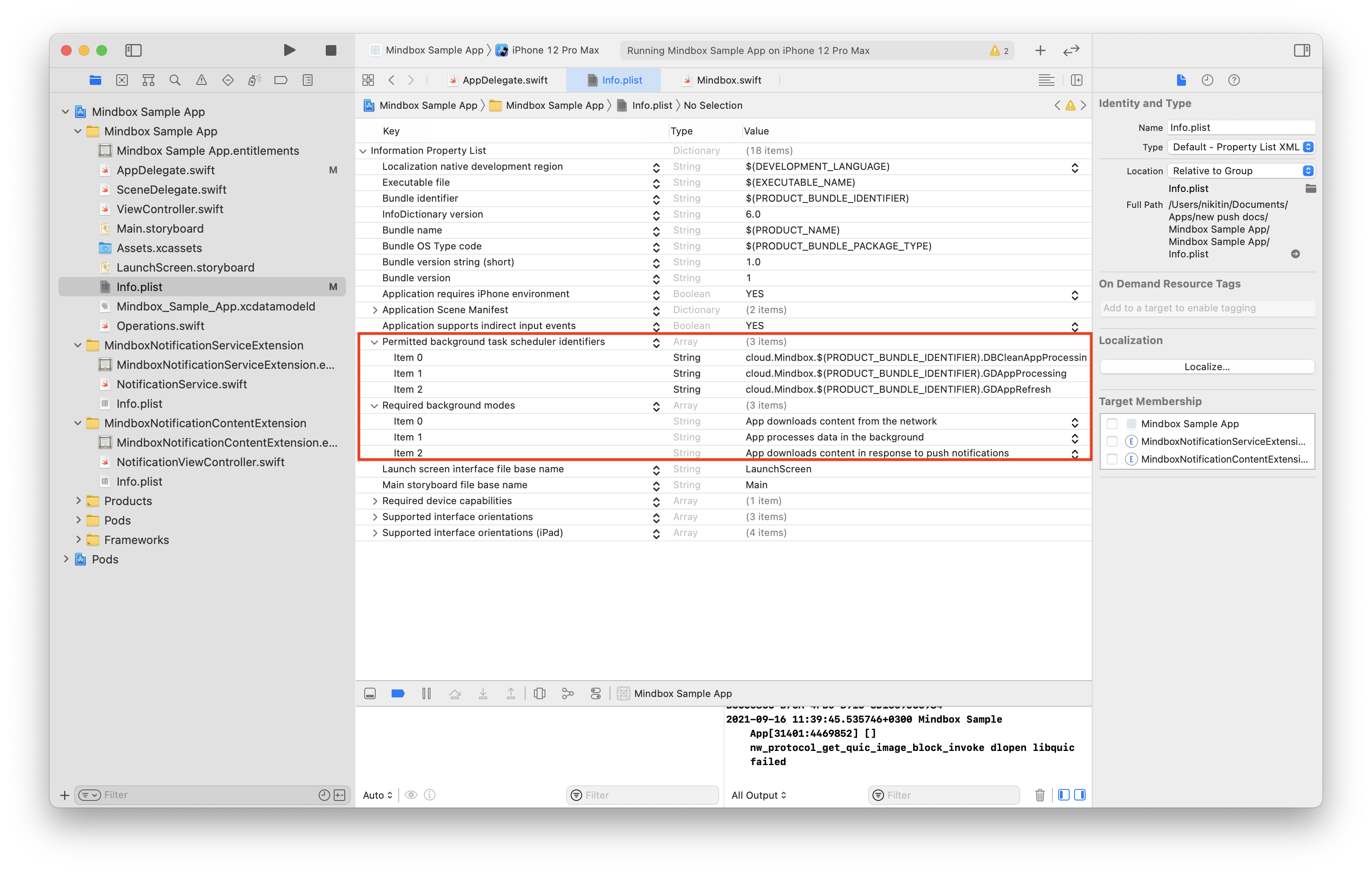
For background tasks to run correctly, add the following to your info.plist parameters:
-
Required background modes:- App downloads content from the network;
- App processes data in the background;
- App downloads content in response to push notifications;
-
Permitted background task scheduler identifiers:cloud.Mindbox.$(PRODUCT_BUNDLE_IDENTIFIER).GDAppRefresh;cloud.Mindbox.$(PRODUCT_BUNDLE_IDENTIFIER).GDAppProcessing;cloud.Mindbox.$(PRODUCT_BUNDLE_IDENTIFIER).DBCleanAppProcessing.
Background Task Registration
If your AppDelegate inherits from MindboxAppDelegate, no additional changes are required to enable guaranteed delivery.
If you’re not usingMindboxAppDelegate, you need to register background tasks manually.
import Mindbox
import UIKit

class AppDelegate: UIResponder, UIApplicationDelegate {

    func application(
        _ application: UIApplication,
        didFinishLaunchingWithOptions launchOptions: [UIApplication.LaunchOptionsKey: Any]?
    ) -> Bool {

        // Registering Background Tasks (iOS 13+)
        if #available(iOS 13.0, *) {
            Mindbox.shared.registerBGTasks()
        } else {
            // Minimum Background Refresh Interval for Older iOS Versions
            UIApplication.shared.setMinimumBackgroundFetchInterval(UIApplication.backgroundFetchIntervalMinimum)
        }

        return true
    }

    // Registering Background Tasks (iOS < 13)
    func application(
        _ application: UIApplication,
        performFetchWithCompletionHandler completionHandler: @escaping (UIBackgroundFetchResult) -> Void
    ) {
        Mindbox.shared.application(application, performFetchWithCompletionHandler: completionHandler)
    }
}
Updated 8 months ago