

Export reports via API
Requirements
An operation configured with the Export — Export dashboards step.
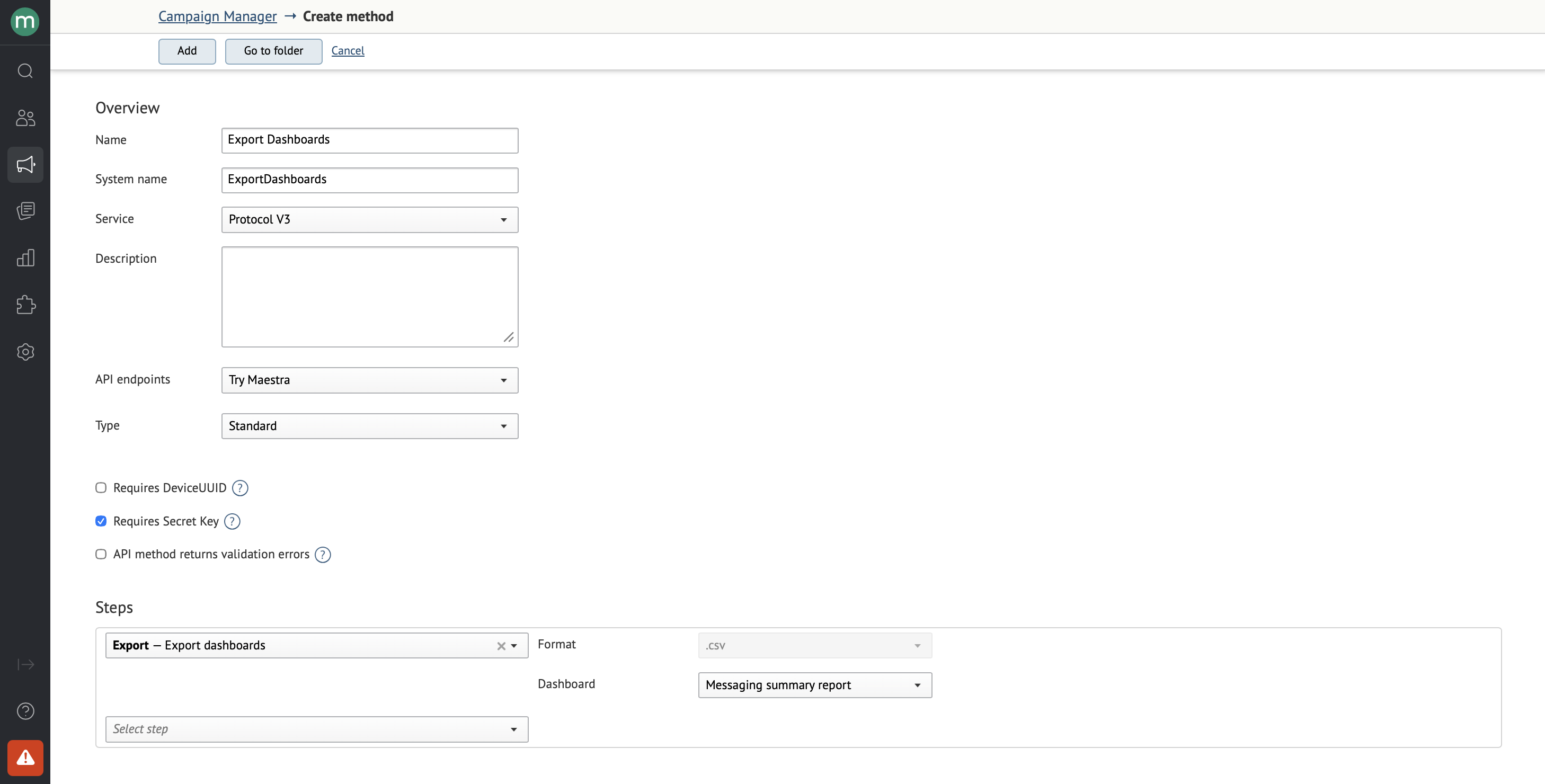
To create this step, you need the Export dashboards permission.
The step supports:
- Campaigns report. Overview.
- Campaigns report. Detailed.
Submit and poll
For the general submit-and-poll flow, see Exports overview.
Request
https://api.maestra.io/v3/operations/sync?endpointId={endpointId}&operation={operation}

Accept: application/json
Content-Type: application/json
Authorization: SecretKey {Secret key}

{
  "sinceDate": "<Start of the report window (project time, YYYY-MM-DD)>",
  "tillDate": "<End of the report window (project time, YYYY-MM-DD)>",
  "goalId": "<Goal ID>"
}
You can pass a date range — the report only includes campaigns that had sends during that window.
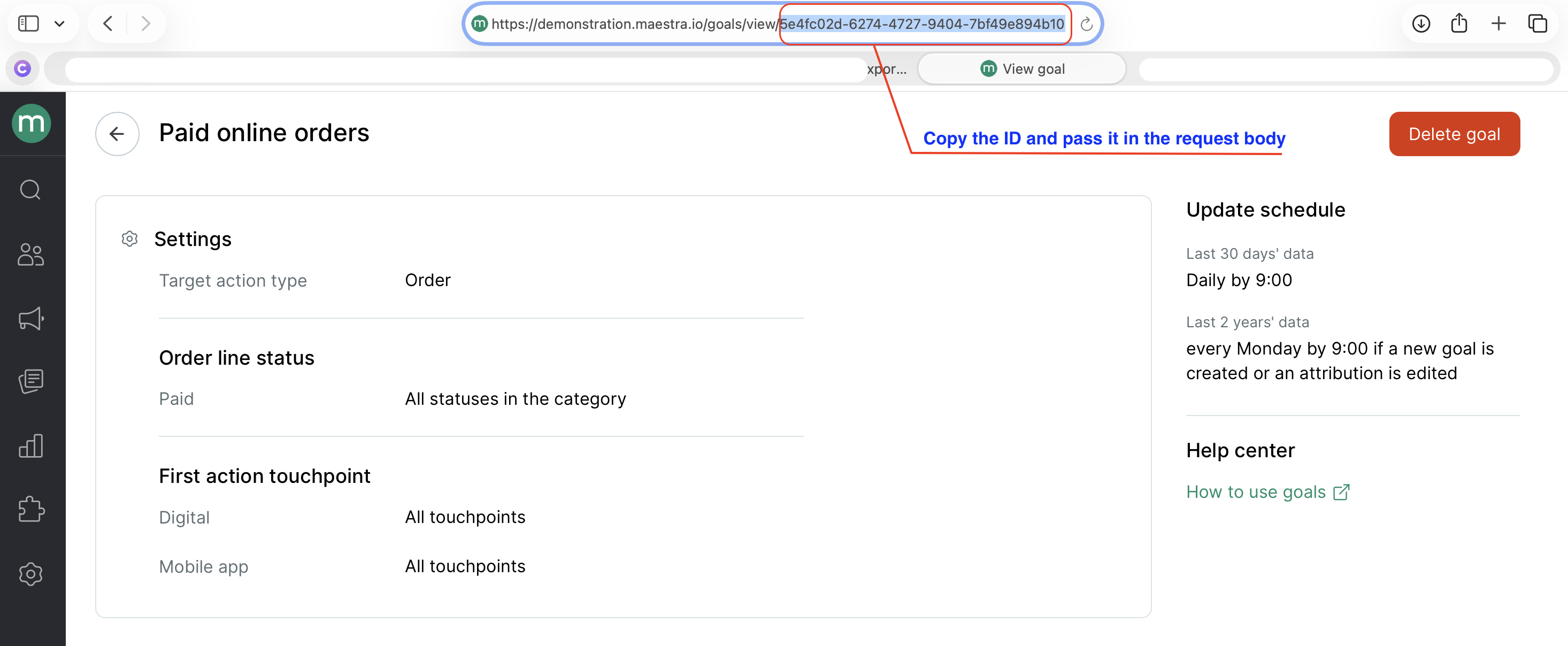
You can also pass goalId — the ID of the goal whose attributed revenue you want to export. If you omit it, the default goal is used.
Where to find the goal ID
Go to Settings → System → Goals and attribution, open the goal's edit page, and copy the goalID from the address bar.
Campaigns report (Detailed): field reference
ReportMessageName— Campaign name.ReportMessageLink— Campaign link.ReportSubject— Email subject.ReportMessagesTotal— Total messages to send.ReportSent— Messages sent.ReportDeliveryRate— Delivery rate — percent of sent messages that were delivered.ReportOpenRate— Open rate — percent of delivered messages that were opened.ReportClickRate— Click rate — percent of delivered messages that got a click.ReportCTOR— CTOR = (clicks / opens) × 100%.ReportConversionRate— Order conversion = (attributed orders / delivered messages) × 100%.ReportUnsubscribeRate— Unsubscribe rate — percent of delivered messages that resulted in an unsubscribe.ReportSpamRate— Spam complaint rate.ReportBounceRate— Bounce rate.ReportConversionsRevenue— Conversion revenue — revenue from orders attributed via last click to messages sent during the period.ReportDelivered— Delivered count.ReportOpened— Unique opens.ReportClicked— Unique clicks.ReportConversions— Conversion count — orders attributed via last click to messages sent during the period.ReportUnsubscribed— Unsubscribes.ReportSpam— Spam complaints.ReportBounced— Bounces from inactive or nonexistent addresses.ReportAverageOrderValue— Average order value — conversion revenue / conversions.ReportConversionRevenuePerRecipient— Revenue per recipient.ReportStartDate— Launch date.ReportTemplate— Campaign template.ReportChannel— Channel (Email, SMS, MobilePush, WebPush, Viber).ReportFolder— Folder.ReportCategory— Category (Bulk, Automated, Transactional).ReportTags— Tags.ReportBrand— Brand.ReportHeatMap— Heat map (email only).ReportMailingId— Campaign ID.ReportMailingVariantNum— Campaign variant number (always1for non-A/B campaigns).
Campaigns report (Overview): field reference
ReportDate— Start of the reporting period. Depends on the grouping in the operation settings: the day for daily grouping, or the first day of the week or month for weekly or monthly grouping.ReportMessageName— Campaign name.ReportMessageLink— Campaign link.ReportSubject— Email subject.ReportRevenue— Revenue from orders attributed to the campaign via last click and placed during the period. Cancelled orders and cancelled order lines are excluded.ReportOrders— Orders attributed to the campaign via last click. Cancelled orders don't count as conversions.ReportMessagesTotal— Total messages to send.ReportSent— Messages sent.ReportDeliveryRate— Delivery rate — percent of sent messages that were delivered.ReportOpenRate— Open rate — percent of delivered messages that were opened.ReportClickRate— Click rate — percent of delivered messages that got a click.ReportCTOR— CTOR = (clicks / opens) × 100%.ReportConversionRate— Order conversion = (attributed orders / delivered messages) × 100%.ReportUnsubscribeRate— Unsubscribe rate — percent of delivered messages that resulted in an unsubscribe.ReportSpamRate— Spam complaint rate.ReportBounceRate— Bounce rate.ReportConversionsRevenue— Conversion revenue — revenue from orders attributed via last click to messages sent during the period.ReportDelivered— Delivered count.ReportOpened— Unique opens.ReportClicked— Unique clicks.ReportConversions— Conversion count — orders attributed via last click to messages sent during the period.ReportUnsubscribed— Unsubscribes.ReportSpam— Spam complaints.ReportBounced— Bounces from inactive or nonexistent addresses.ReportAverageOrderValue— Average order value — conversion revenue / conversions.ReportConversionRevenuePerRecipient— Revenue per recipient — conversion revenue / delivered messages.ReportStartDate— Launch date.ReportTemplate— Campaign template.ReportChannel— Channel (Email, SMS, MobilePush, WebPush, Viber).ReportFolder— Folder.ReportCategory— Category (Bulk, Automated, Transactional).ReportTags— Tags.ReportBrand— Brand.ReportHeatMap— Heat map (email only).ReportMailingId— Campaign ID.ReportMailingVariantNum— Campaign variant number (always1for non-A/B campaigns).
Backward compatibility
Updated 25 days ago